Getting Started with Genesys Interaction Recording
Welcome to Genesys Interaction Recording (GIR). If you want to know more about GIR itself and where it fits in your Genesys solution, click here. This page is intended to help you dive in to configuring and working with GIR, so let’s get started.
Since GIR is one of those Genesys offerings that is built on an existing Genesys platform, before you can enable recording, this page will give you a quick overview of the main requirements and steps needed, so you can record and save your customer interactions, and play those interactions back in order to help optimize your workforce performance and customer experiences.
Each of the links below takes you a main page for that product. Each page will tell you how to install and configure the component to enable recording. Once everything is in place, you can jump down to the features section where there are links to additional configuration you need to make.
About Genesys Interaction Recording
This powerful solution will enable the modern contact center to record the entire customer interaction, using the Genesys Speech and Text Analytics platform, across multiple sites and interactions, allowing the contact center to meet quality or regulatory compliance requirements. [+] Show more
Genesys provides your organization with reliable, high-quality recordings of both audio communications and desktop screen activity. Now you can capture 100% of all interactions, even if customers are transferred multiple times to agents in geographically dispersed locations. Interaction recordings can even be shared and sent through email to your agents, managers or customers, as required. And, if there is a customer complaint or dispute, interaction metadata saves you valuable time in locating the right interaction from thousands of hours of recordings.
Integrated into the Genesys Customer Experience Platform, through native integration with the Genesys SIP communications infrastructure, you can record 100% of all interactions. Genesys Interaction Recording can analyze metadata from each interaction and evaluate which interactions must be recorded using user-defined recording rules. Employing this same metadata, you can quickly search and retrieve stored recordings, helping to resolve any customer complaints more efficiently.
Your customer service organization can benefit immediately from recording integration, as configuration and maintenance are performed within one platform. You can define recording profiles to meet internal and external policy requirements, including the ability to archive recorded sessions to separate storage locations. Single sign-on and role-based access ensures recorded interactions are viewed by authorized employees only, and sensitive data is hidden to prevent unauthorized data loss.
Architecture Overview
We need to say why each may be appropriate?
Recording Inbound Interactions
Recording-Only Mode
- When a call enters the contact center, SIP Server sends the call to GVP (MCP&RM) to process the recording.
- MCP, using an HTTP PUT, sends the mp3 recording to WebDAV for storage.
- When MCP receives a 200 OK from WebDAV, MCP, using an HTTP POST, sends the recording’s metatdata information to the RPS.
- RPS parses metadata received from MCP and retrieves corresponding metadata from the ICON database that would have been provided by other possible SIP Servers. (this is a direct connection as configured in the rpconfig.cfg file)
- Once the metadata is retrieved from the ICON database successfully, RPS, using an HTTP POST, sends the information about the recording to Web Services.
- Web Services stores the recording information to the Cassandra database.
- Web Services tells RPS, with a 200 OK message, that the recording information is stored.
- RPS sends the recording to the SpeechMiner UI.
Recording and Analytics Mode
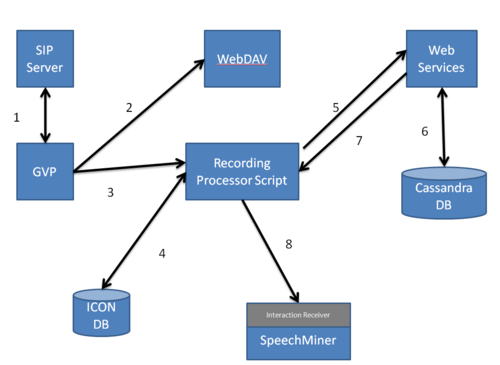
- When a call enters the contact center, SIP Server sends the call to GVP (MCP&RM) to process the recording.
- MCP, using an HTTP PUT, sends the mp3 recording to WebDAV for storage.
- MCP, using an HTTP PUT, sends a .WAV recording to Interaction Receiver for analytics.
- When MCP receives a 200 OK from WebDAV, MCP, using an HTTP POST, sends the recording’s metatdata information to the RPS.
- RPS parses metadata received from MCP and retrieves corresponding metadata from the ICON database that would have been provided by other possible SIP Servers. (this is a direct connection as configured in the rpconfig.cfg file)
- Once the metadata is retrieved from the ICON database successfully, RPS, using an HTTP POST, sends the information about the recording to Web Services.
- Web Services stores the recording information to the Cassandra database.
- Web Services tells RPS, with a 200 OK message, that the recording information is stored.
- RPS sends the recording to the SpeechMiner UI.
Screen Recording here
Playing Recorded Inbound Interactions
Is this the same for both call and screen?
- User logs into the SpeechMiner UI.
- SpeechMiner opens a 2 way session with RCS.
- RCS verifies the user’s login credentials with the configuration database.
- When the user’s credentials are successfully verified, an API call is made to SpeechMiner. SpeechMiner makes an API call to RCS. RCS tells Web Services to find the recording file.
- Web Services checks with the Cassandra database.
- When the recording file is found in the database, Web Services tells WebDAV to retrieve the file from storage.
- WebDAV streams the recording via API calls to RCS, SpeechMiner and the user. (need to verify this flow) This is where RCS decrypts the recordings if they are encrypted? Yes
Before You Start
Before you can enable recording, you must have the following Genesys components installed, and configured:
Genesys Components
GIR Features
You will also need to configure the following features:


