| Name
|
Mandatory
|
Description
|
Default value
|
| CaPath
|
N
|
The path for the authority PEM certificate file used for verification of encryption certificates. If not present, verification will not take place.
|
false
|
| cleanupPolicy
|
N
|
Specifies the method for managing failed screen recording files on the Client machine. The available values are:
- delete—Deletes the recording from the local drive regardless if upload was successful or not.
- keep—Deletes successfully uploaded recordings. Recordings whose upload failed will be stored in a sub folder called "Problem Videos", after which they will not be uploaded or deleted by the Screen Recording Client.
- keepForever—All recordings are kept permanently on the local drive. Successfully uploaded recordings will be store in a sub folder called "Uploaded", unsuccessfully uploaded videos will be stored in the "Problem Videos" folder. Recordings in those folders will not be uploaded or deleted by the Screen Recording Client. Note that this setting is recommended for debug purposes only because it can cause disk space to run out quickly.
|
keep
|
| clockColor
|
N
|
The color of the time stamp clock. Use HTML color codes.
|
0xffffff (white)
|
clockFormat
|
N
|
The display format for the time stamp clock. See the table later in this section for the valid values.
|
%H:%M:%S-%Y-%m-%d %Z (HH:MM:SS-YYYY-MM-DD TZ)
|
| clockOpacity
|
N
|
How non-transparent the time stamp clock displays. Valid values: 0-255
|
150
|
| clockPosition
|
N
|
The position for time stamp clock. Valid values: 0=center, 1=left, 2=right, 4=top, 8=bottom. You can also use combinations of these values—for example, 6 = top-right.
|
8 (bottom-center)
|
| clockSize
|
N
|
The font size for the timestamps written to the screen.
Note: This option is available if the timeStamp option is set to true.
|
40
|
| delayShutdown
|
N
|
The time, in seconds, to delay shutting down the SRS and the system if the uploadPolicy parameter is set to immediate. This allows all the screen recording files to upload before the shutdown starts. The maximum value is 125 seconds (limited by Windows).
|
15
|
| diskFreeSpaceLimit
|
N
|
The minimum disk space, in MB, on the client machine. When the disk space drops below this value, the screen recording will stop any active recording sessions.
|
2000
|
| encodingFps
|
N
|
The minimum frame rate used for encoding. This parameter should always be set to a value that is equal to or higher than the value set for the fps parameter. For example, if fps is set to 1:
- If encodingFps is set to 2, the minimal time to recording will be approximately six seconds.
- If encodingFps is set to 4, the minimal time to recording will be approximately five seconds.
- If encodingFps is set to 5, the minimal time to recording will be approximately four seconds.
Note: Increasing the encodingFps value will result in a larger file size.
|
1
|
| encodingLevel
|
N
|
The H.264 encoding level restriction. Valid values: 10,11,12,13,20,21,22,30,31,32,40,41,42,50,51. For more information, see
H.264/MPEG-4 AVC Levels.
|
41
|
| encodingProfile
|
N
|
The H264 encoding profile. Valid values: baseline, main, high.
|
high
|
| folder
|
N
|
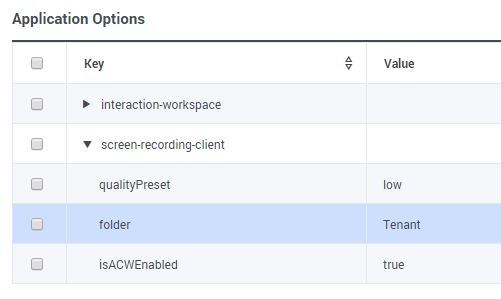
The folder name where the media is uploaded in the WebDAV server.
|
/
|
| fps
|
N
|
Frames per second.
|
1
|
| forceUpdate
|
N
|
Indicates whether to automatically update the software. If set to true, the Screen Recording Client will either update to a newer or older version of the software.
|
false
|
| grayScale
|
N
|
Indicates whether to record the screen in color or gray scale. Set to true to record in gray scale. Set to false to record in color.
|
false
|
isACWEnabled
|
N
|
Indicates whether to record the agent when in the After Call Work state.
Note: You must also configure the wrap-up-time parameter on the Agent's Login object.
|
true
Note: If isACWEnabled is set to any value other than false, then the value is true.
|
| keepAspectRatio
|
N
|
Indicates whether to keep the original aspect ratio or stretch the video to fill the screen if the screen resolution is large than the maximum resolution, and the screen is down scaled.
|
true
|
| logsToKeep
|
N
|
The number of log files to keep.
|
10
|
| logLevel
|
N
|
The logging level. Set to one of the following: debug, info, warning, error, critical. Only messages with a level set equal to or above the defined level will be logged.
|
info
|
| maxDurationMinutes
|
N
|
The maximum duration, in minutes, before slicing a screen recording file. This is used for non-voice interactions only.
|
10
|
| maxHeight
|
N
|
The maximum height resolution in pixels. The client will always use the lower resolution defined by either the maxHeigh/maxWidth parameters or the resolutionScale parameter.
|
1080
|
| maxLogSize
|
N
|
The maximum size, in MB, of the log file before a new log file is created. The old log file is named with the .1 extension. Set the value to 0 if you do not want to limit the log file size.
|
5
|
| maxWidth
|
N
|
The maximum width resolution in pixels. The client will always use the lower resolution defined by either the maxHeigh/maxWidth parameters or the resolutionScale parameter.
|
1920
|
| multipleMonitorsEnabled
|
N
|
Indicates whether to record on all available monitors. If set to false, the client will record on the primary display monitor only.
|
true
|
qualityPreset
|
N
|
Defines the desired bitrate, depending on the agent's screen resolution. Valid Values:
- low—Emphasis is on storage capacity, and text is readable 90% of the time. For example, 120 Kbps for 1920 x 1080 resolution with color.
- standard—Text should be readable 100% of the time with normal use. For example, 150 Kbps for 1920 x 1080 resolution with color.
- high—Emphasis is on quality, and text should be readable 100% even on a high movement environment. For example, 190 Kbps for 1920 x 1080 resolution with color.
See the table later in this section for the full list of preset examples.
|
standard
|
recordingWhen
|
N
|
An expression from configuration states when screen recording should be taking place for a particular recording client. The format is:
recordingWhen= condition1,condition2,... where condition1,condition2..., are a set of conditions that must all be true in order for the screen recording to take place. In other words: Screen Recording Active = condition1 && condition2 && ...
Note: If the state of any of the conditions is unknown (occurs only before first determining agent state, so limited to initial state), then the state of screen recording is unknown. See the table later in this section for the full list of conditions.
|
This parameter is optional for the Screen Recording Client and defaults to an empty value.
|
| resolutionScale
|
N
|
Used to scale the screen size. Setting resolutionScale to 0.5 will resize the screen resolution in half. Setting it to 1 will do nothing. The client will always use the lower resolution defined by either the maxHeigh/maxWidth parameters or the resolutionScale parameter.
|
1
|
| saveCredentialsToVault
|
N
|
Indicates whether to upload screen recordings after a system restart without requiring the agent authentication credentials. If set to true, the agent's credentials are saved into the local Windows vault.
|
true
|
| sleepNoConnection
|
N
|
The maximum time, in minutes, that the client will sleep if there is no connection with the server before attempting to reconnect.
|
1
|
| sleepNoNewVersion
|
N
|
The time, in minutes, that the client updater thread will sleep if there is no new version available.
|
1440(24H)
|
| slowMachine
|
N
|
Indicates whether the screen recording client is installed on a slow machine, so that the extra time is available to save the video files before closing the client.
|
false
|
| softwareChecksum
|
N
|
The SHA512 checksum of the latest software setup file.
|
Empty
|
| softwareUrl
|
N
|
The URI used to fetch the latest screen recording client software installation package.
|
None
|
| softwareVersion
|
N
|
The latest screen recording client software version number.
|
Empty
|
| timeout
|
N
|
The timeout duration, in seconds, for HTTP requests. This value must be bigger than the cometD Server request timeout.
|
60
|
| timeStamp
|
N
|
Indicates whether a time stamp will be water marked on the video.
|
false
|
| uploadPolicy
|
N
|
Specifies the screen recording upload policy. If set to window, the screen recording files are uploaded to storage during the times specified by the windowStartTime and windowEndTime parameters. If set to immediate, the files are uploaded immediately; however, after the agent's last call, the Screen Recording Client needs some time to upload the recording to the server before the Agent's desktop shuts down. The amount of time needed depends on the duration of the last call and network speed. Genesys recommends to estimate one minute for every minute of screen recording on a network with 150Kbits per second and and upload speed approximate to 20 KB per second. For example, if the last screen recording lasted 10 minutes, and the network speed is 300Kbits/s (~40KB/s), five minutes is required.
Note: If the Agent's PC is shutdown before the upload is completed, the recording will be uploaded on next PC start up.
|
immediate
|
| videoBitrate
|
N
|
Encoding bitrate. Use this parameter to override the default bitrate that is calculated based on the resolution and the selected qualityPreset value.
|
150 Kbps for 1920 x 1080 resolution (standard preset, color recording)
|
| windowEndTime
|
N
|
Specifies the upload end time, in the local time. The format is hh.mm:—for example, 23:00. This parameter is mandatory for the Window upload policy.
|
Empty
|
| windowStartTime
|
N
|
Specifies the upload start time, in the local time. The format is hh.mm:—for example, 23:00. This parameter is mandatory for the Window upload policy.
|
Empty
|