Managing and Scheduling Jobs
This page describes how to manage and schedule the Genesys Info Mart jobs, either automatically or manually, using Genesys Info Mart Server and Genesys Info Mart Manager.
For descriptions of the Genesys Info Mart jobs, see About Jobs. For information about how Genesys Info Mart handles errors that it might encounter during job execution, see Troubleshooting Genesys Info Mart jobs.
Important
Notes:
- Before you can execute any job, you must complete the tasks in the Genesys Info Mart Deployment Guide.
- The Genesys Info Mart Server checks the integrity of the Genesys Info Mart deployment and prevents any new job from starting if the configuration check encounters errors in the items that it validates. For more information about when Genesys Info Mart performs the configuration check and which items it checks, see the section about deployment verification in the chapter about maintenance and other activities in the Genesys Info Mart Deployment Guide.
Scheduling jobs with Genesys Info Mart Server
The Genesys Info Mart Server launches jobs based on the scheduling options that you configure in the Genesys Info Mart application, with any necessary adjustments to accommodate logical rules that guide scheduling. (For convenience, this function is called the Scheduler.)
The basic unit of scheduling is the cycle. The ETL cycle performs the following functions:
- Extracts data from each data source.
- Transforms the extracted data, and loads the transformed data into the Dimension tables and the Fact tables.
Additional jobs run on a scheduled basis to perform the following functions:
- An optional aggregation process, which runs in parallel with the ETL cycle, runs continuously within configured time intervals to populate Aggregate tables, in an environment where either Genesys Interactive Insights () reports or Reporting and Analytics Aggregates () package are deployed.
- Job_MaintainGIM, which runs outside the ETL cycle, purges data from the Info Mart database, in accordance with configurable data retention policies. The job also maintains the default and custom calendars. In partitioned databases, the job also maintains the partitions.
- In PostgreSQL deployments, Job_UpdateStats, which runs in parallel with the ETL cycle, performs supplementary database maintenance.
The following topics provide additional information about scheduling jobs:
-
[+] Expand: Scheduling the ETL cycle
Scheduling the ETL cycle
ETL Cycle Configuration Options—The options that control the ETL cycle enable you to specify the:
- Time of day that the first ETL cycle should begin
- Time of day that the final ETL cycle should begin
- Frequency of the ETL cycle
Non–ETL-Related Scheduling Options—You configure additional options to specify:
- Whether calculation of aggregates occurs in parallel with the ETL cycle
- The times of day when the purging of old Info Mart data should start and end
- In PostgreSQL deployments, whether and when Job_UpdateStats will run
- The time zone in which the schedule will be defined
The configuration options also enable you to:
- Temporarily stop Genesys Info Mart Server from launching scheduled jobs
- Stop Genesys Info Mart Server from launching the job that calculates the Aggregate tables
- Stop Genesys Info Mart from launching the job that purges old data from the Info Mart database
-
[+] Expand: Job sequencing rules
Job sequencing rules
Genesys expects that jobs will usually follow an orderly sequence in accordance with a configured schedule: Job_ExtractICON followed by Job_TransformGIM in repeated ETL cycles, with Job_AggregateGIM (in deployments with Genesys-provided aggregation) and Job_UpdateStats (in PostgreSQL deployments) running in parallel with the ETL cycle, followed by a daily run of Job_MaintainGIM in a maintenance window during which no other jobs are running.
You can start a job manually at any time from Genesys Info Mart Manager—for example, you might need to run Job_MaintainGIM in order to populate a reconfigured calendar or, if your Info Mart database is partitioned, in order to create new partitions before the next extraction.
Job_TransformGIM has a logical dependence on Job_ExtractICON, and Job_AggregateGIM has a logical dependence on Job_TransformGIM. That is, until you perform an extraction, there is nothing to transform, and until you have performed extraction and transformation, there is no data to aggregate. Genesys Info Mart does not enforce any rules regarding logical dependence. If you manually run a job before the logically prior job has completed, the “later” job will simply not process any data.
To prevent deadlocks, it is important that no other jobs run while Job_MaintainGIM is running. Genesys Info Mart enforces this rule against parallel execution when jobs are run by the Scheduler.
Scheduler-run jobs
When you have Scheduler-run jobs on a configured schedule (see selow, Setting scheduling options for Genesys Info Mart Server), Scheduler manages jobs automatically according to the following rules:
- The Genesys Info Mart Server does not start a job if there is another instance of that job already running.
- During a scheduled ETL cycle, Scheduler launches the transformation job after the extraction job completes.
- Scheduler ensures that the extraction and transformation jobs do not run at the same time as the maintenance job, which purges Info Mart data. If the last cycle of the extraction and transformation jobs is still running when the maintenance window starts, Scheduler waits for the extraction and transformation jobs to complete before it allows the maintenance job to start.
If a scheduled ETL cycle is set to begin before a maintenance job is finished, Scheduler stops the maintenance job and starts the ETL cycle.
- In PostgreSQL deployments, Scheduler allows Job_UpdateStats to run in conjunction with the ETL jobs. Scheduler will not wait for Job_UpdateStats to complete before it allows the maintenance job to start. However, once the maintenance job has started as part of the configured schedule, Scheduler suspends the schedule for Job_UpdateStats until the maintenance job finishes.
Jobs run from Genesys Info Mart Manager
When you start a job from Genesys Info Mart Manager (see below, Managing jobs with Genesys Info Mart Manager) the Genesys Info Mart Server manages the jobs according to the following rules:
- The Genesys Info Mart Server does not start a job if there is another instance of that job already running.
- You can launch the transformation job manually from Genesys Info Mart Manager while an extraction job is running, but the transformation job will not do anything if no data has been extracted.
- The Genesys Info Mart Server does not prevent other jobs from running at the same time as the maintenance job. To prevent deadlocks that can lead to job failures, ensure that you suspend the ETL schedule and, in PostgreSQL deployments, the Job_UpdateStats schedule, before you run Job_MaintainGIM from Genesys Info Mart Manager.
- In the case of the aggregation job, Genesys Info Mart Server does not allow an instance of the job to run outside the regularly scheduled intervals within which Job_AggregateGIM has been configured to run. For example, if Job_AggregateGIM has been configured to run every day between 01:00 AM and 06:00 AM, you will not be able to launch Job_AggregateGIM manually from Genesys Info Mart Manager at any time outside that time period (for example, at 08:00 AM).
-
[+] Expand: Sample schedule
Sample schedule
The figure Sample Genesys Info Mart Server Schedule depicts a sample Genesys Info Mart Server job schedule that runs repeated ETL cycles throughout the day. The deployment includes aggregation, and the aggregation job has been scheduled to run for 23 hours out of each day, leaving one hour each day when Job_AggregateGIM is stopped, providing an opportunity for Job_MaintainGIM to run.
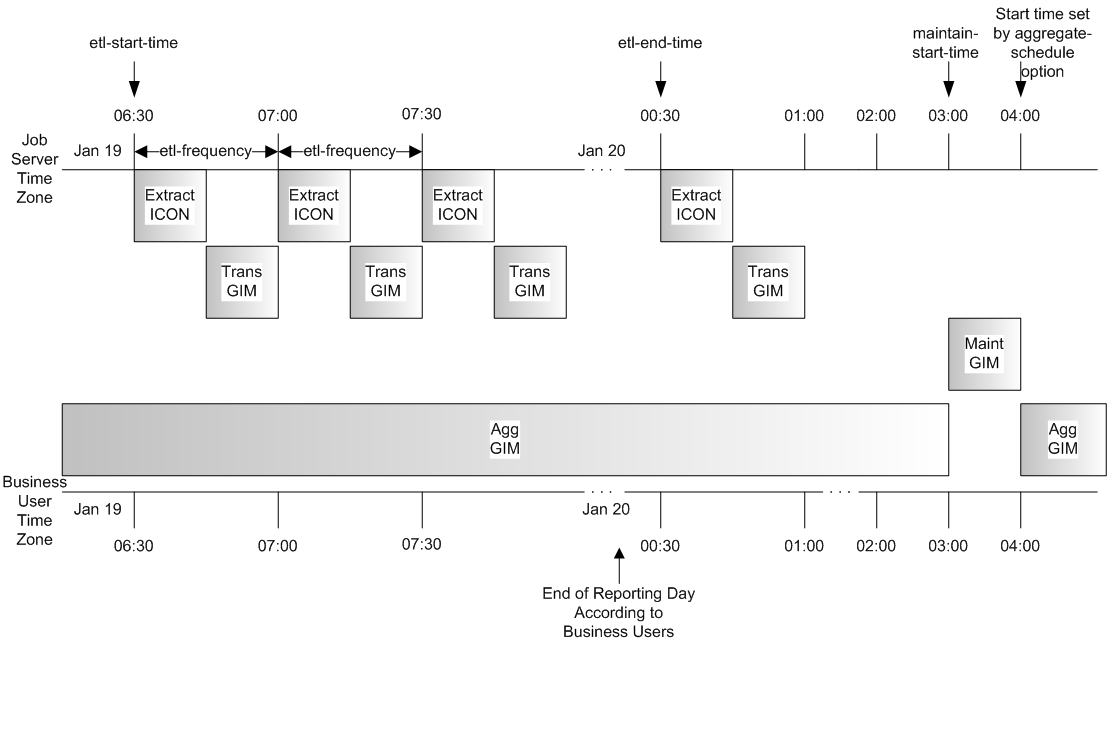 The schedule options are set as follows:
etl-start-time = 06:30
etl-end-time = 00:30
etl-frequency = 30 minutes
maintain-start-time = 03:00
aggregate-schedule = 0 4
aggregate-duration = 23:00
timezone = <business user local time zone>
The schedule has been defined in the local time zone of the business user that will query the Info Mart data. Therefore, from the perspective of the business user, the Genesys Info Mart Server is in the same time zone, and the final extraction cycle, which begins at 00:30, contains all the reporting data from the previous day.
Important
Midnight in local time is considered to be the end of the reporting day for a particular time zone.
-
[+] Expand: Procedure: Setting scheduling options for Genesys Info Mart Server
Setting scheduling options for Genesys Info Mart Server
The information in this subsection supplements information in the Genesys Info Mart Deployment Guide about configuring the Genesys Info Mart Application.
Use the following procedure to configure the Genesys Info Mart Server [schedule] options. Genesys Info Mart Server uses these options to launch the ETL, aggregation, maintenance, and, in PostgreSQL deployments, supplementary maintenance jobs. Each configuration option is related to one or more of the jobs.
The schedules for the ETL and maintenance jobs are defined in 24-hour time spans in the format HH:mm, where HH is the number of hours (00–23), and mm represents the number of minutes (00–59). The 24-hour schedule can span two calendar days. For example, if the etl-start-time is defined as 18:00 and the etl-end-time is defined as 06:00, the start time is 6:00 PM one day and the end time is 6:00 AM the following day.
For information about the functions of the jobs, see Understanding Genesys Info Mart jobs. For information on job interdependencies, see Job sequencing rules.
Procedure: Setting up the Genesys Info Mart jobs schedule
Purpose: To create or modify the schedule for running Genesys Info Mart jobs.
You can perform this procedure at any time, even while Genesys Info Mart jobs are running. Changes take effect immediately.
Steps
- In Configuration Manager, navigate to the Options tab of the Genesys Info Mart Application object.
- Navigate to the [schedule] section.
- Time Zone—(Optional) Enter a value for timezone to specify a local time zone in which you want to define the schedule. You can use any valid time zone that is supported by the version of the Java Runtime Environment (JRE) that runs the Genesys Info Mart Server. The default time zone is GMT.
For links to more information about supported time zones, see the description of the timezone option in the configuration options reference chapter in the Genesys Info Mart Deployment Guide.
- ETL Schedule—Enter a value for etl-start-time to specify the time of day that the first ETL cycle begins.
- Enter a value for etl-end-time to specify the time of day that the final ETL cycle begins. The etl-end-time value should be a time of day when no other ETL cycles will begin.
- Enter a value for etl-frequency to specify the number of minutes between the start times of adjacent ETL cycles.
If the time that it takes to complete a cycle is shorter than the ETL frequency, the next cycle is delayed until the time interval is met. If the time that it takes to complete a cycle is greater than this value, the next cycle starts immediately.
Important
Various
extract-* options in the
[gim-etl] section control aspects of extraction and transformation job functioning that significantly affect ETL cycle performance. When you set the ETL scheduling options, consider the values of these related options as well. For more information, see the configuration recommendations in the chapter about ETL processing in the
Genesys Info Mart Deployment Guide. See also the option descriptions in the configuration options reference chapter in the
Genesys Info Mart Deployment Guide.
- To start or resume the ETL schedule, set run-scheduler to true. You can set this option to false to temporarily stop Genesys Info Mart Server launching jobs.
- Routine Maintenance for PostgreSQL—In PostgreSQL deployments, configure Genesys Info Mart to update statistics regularly and perform additional supplementary maintenance:
- Set run-update-stats to true. This option specifies whether the Genesys Info Mart Server launches the supplementary maintenance job, Job_UpdateStats, as scheduled.
- Set update-stats-schedule to the start time and time intervals at which you want the job to run every day. The value must be expressed as a valid CRON expression—a string, which in this case uses only two fields, minute and hour, separated by whitespace.
The default value (0/10 *) schedules the job to run every 10 minutes throughout the day. You do not need to consider the ETL and maintenance schedules when setting the Job_UpdateStats schedule, for reasons that are described in Job sequencing rules.
For a detailed description of this option, see the configuration options reference chapter in the Genesys Info Mart Deployment Guide.
- Aggregation Schedule—If you plan to use the Info Mart historical Aggregate tables:
- Set run-aggregates to true. This option specifies whether the Genesys Info Mart Server launches the job, Job_AggregateGIM. This job calculates the Aggregate tables based on newly added or changed data in the fact tables.
- Set aggregate-schedule to the time that you want the aggregation job to start (as long as it is not currently running, such as following the initial deployment of the aggregates). The value must be expressed as a valid CRON expression—a string, which in this case uses only two fields, minute and hour, separated by whitespace.
For example, to set the aggregation start time to 2:30 AM, enter the value 30 2. For another example, see Sample schedule. For a detailed description of this option, see the configuration options reference chapter in the Genesys Info Mart Deployment Guide.
- Set aggregate-duration to the length of the period, in HH:mm format, during which the aggregation job will run after each launch. Within the time intervals defined by the aggregate-schedule and aggregate-duration options, the aggregation job runs continuously.
For example, to have aggregation run for the twelve hours following the start time, set the value for the duration option to 12:00. For another example, see Sample schedule.
- Set aggregation-engine-class-name as described in the Genesys Info Mart Deployment Guide. This option specifies the class name of the aggregation package.
In order for Aggregate tables to be created and populated in the Info Mart database, you must deploy either GI2 or RAA.
If you do not plan to use the Info Mart Aggregate tables, keep the default value of the run-aggregates option (false). This setting ensures that the Genesys Info Mart Server does not launch Job_AggregateGIM in deployments where the Genesys-provided aggregation engine is not deployed.
- Maintenance Schedule—If you plan to run the maintenance job daily, configure the maintenance job schedule:
- Set run-maintain to true. This option specifies whether the Genesys Info Mart Server launches the maintenance job, Job_MaintainGIM, as scheduled.
- Set maintain-start-time to the time of day that you want Genesys Info Mart to launch Job_MaintainGIM. The time of day must be outside the range that is specified by etl-start-time and etl-end-time. The Genesys Info Mart Server will not start Job_MaintainGIM until the maintain-start-time has been reached or when other jobs are running.
Important
You must run the maintenance job regularly if your Info Mart database is partitioned. Genesys strongly recommends that you configure a schedule for the maintenance job if your Info Mart database is partitioned, if you plan to purge eligible data from the Info Mart database, or if your deployment uses custom calendars.
For information about setting the retention policy options that determine what data will be purged when Job_MaintainGIM executes, see the section about purging the Info Mart database in the chapter about maintenance and other activities in the
Genesys Info Mart Deployment Guide.
- Export Schedule—Optionally, enable the export of data from the Info Mart database into local .csv files, as follows:
- Modify configuration settings in the Genesys Info Mart Application object, as follows, to enable the export function for your deployment:
- Create a new [gim-export] configuration section, if it does not already exist. Within this section:
- Configure the output-directory configuration option with a value that defines the path to the export storage folder. By default, the folder is named output and is created within the Genesys Info Mart installation directory.
- Configure the days-to-keep-output-files configuration option with a value that defines the number of retention days for the exported data. The default value is 14 days.
- In the [schedule] configuration section, create a new export-schedule configuration option (if it does not already exist) and set a value that defines the schedule for Job_ExportGIM. The value must be a valid CRON expression. (For details on the format, see a complete No results option description.) By default, the export job runs at 00:20, 08:20, and 16:20 each day.
- Make changes to the default settings for other configuration options, if necessary. The following options control Job_ExportGIM:
- No results
- No results
- No results
- No results
- No results
- No results
- No results
- No results
- No results
- In the [schedule] section of the Genesys Info Mart Application object, create a new run-export configuration option (if it does not already exist) and set it to true, to start running the export job according to the schedule.
Managing jobs with Genesys Info Mart Manager
Normally, the Genesys Info Mart Server launches scheduled jobs automatically. However, you can use the Genesys Info Mart Manager to:
- Execute a single job as needed.
- Cancel a job that is in Scheduled status. (A scheduled job is one that did not start immediately (for example because it cannot run while another job is running, and another job was already running), but it will start later.)
- Stop a running job.
For example, you can use this functionality in Genesys Info Mart Manager to:
- Execute one or more jobs to recover from job failures.
- Execute Job_ExtractICON following the update of configuration data in Interaction Database (IDB) with the Interaction Concentrator (ICON) on-demand resynchronization feature.
- Manually run the job that aggregates Info Mart data (Job_AggregateGIM), provided that Genesys Info Mart has not been configured to run the aggregation job on a schedule. (In other words, you can start or stop Job_AggregateGIM from the Genesys Info Mart Manager only if the run-aggregates configuration option, in the [schedule] section, has been set to false.)
- Manually run Job_AggregateGIM to re-aggregate Info Mart data.
- Run the maintenance job outside the scheduled time, provided that no instances of other jobs are running.
- Execute a single job as needed.
- Selectively shut down a running job.
Important
You cannot use Genesys Info Mart Manager to run Job_UpdateStats or Job_ExportGIM.
Job management procedures
The following procedures describe how to use Genesys Info Mart Manager to manage jobs:
-
[+] Expand: Procedure: Running jobs one by one
Running jobs one by one
Initially after deploying Genesys Info Mart, you may want to run the jobs one by one to test the best values for various configuration options, rather than immediately scheduling them to run routinely. Or, rarely, you may need to run jobs one by one while troubleshooting. In these special situations, use the following procedure to run the jobs one by one.
Procedure: Running jobs one by one with Genesys Info Mart Manager
Purpose: This procedure describes how to run jobs manually, one by one, for testing or troubleshooting purposes.
Steps
- ETL Cycle Jobs—Set the run-scheduler configuration option (in the [schedule] section on the Genesys Info Mart Options tab) to false.
- Follow the steps in Running a job immediately to run the jobs that perform ETL processing.
Run the jobs in the following order:
- Job_ExtractICON (see the following Note)
- Job_TransformGIM
Important
The extraction job extracts data from all available IDBs, for all extraction roles. When you have completed your trial runs or troubleshooting, restore normal running conditions by setting the
run-scheduler configuration option to
true to have the Genesys Info Mart Server launch jobs based on a schedule you configure in the Genesys Info Mart application. For more information, see
Setting scheduling options for Genesys Info Mart Server.
- Aggregation Job—If your deployment includes aggregation and you want to run Job_AggregateGIM as a non-scheduled job, set the run-aggregates configuration option (in the [schedule] section on the Genesys Info Mart Options tab) to false.
- Follow the steps in Running a job immediately to start Job_AggregateGIM. The job will run continuously until you manually stop it, or until you reset the run-aggregates configuration option from false to true and the configured daily schedule comes into effect.
- Maintenance Job—Set the run-maintain configuration option (in the [schedule] section on the Genesys Info Mart Options tab) to false.
- In the job list of the Genesys Info Mart Manager, verify that no other jobs are running.
- Follow the steps in Running a job immediately to start Job_MaintainGIM.
After the initial run, you can set the run-maintain configuration option to true, so that the Genesys Info Mart Server launches the maintenance job based on the schedule you configured in the Genesys Info Mart application. For more information, see Setting scheduling options for Genesys Info Mart Server.
-
[+] Expand: Procedure: Running a job immediately
Procedure: Running a job immediately with Genesys Info Mart Manager
Purpose: This procedure describes how you can use Genesys Info Mart Manager to run a job immediately.
Steps
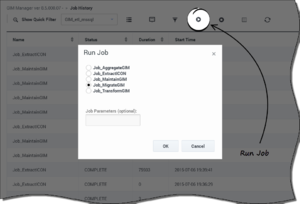
Genesys Info Mart Manager Run Job Dialog Box
- In Genesys Info Mart Manager, click Run Job.
The Run Job dialog box appears, as shown in the Figure Genesys Info Mart Manager Run Job Dialog Box.
- From the list, select the job that you wish to execute.
Important
Only Job_AggregateGIM supports parameters. For all other jobs, leave the
Job Parameters field blank. For more information, see
Re-aggregating data.
- Click OK.
The job you have started appears in the job list. You can find it more easily by sorting the list (for example, by Start Time, or by Status). The job you ran will have one of the following status values:
- Running
- Scheduled—This indicates that the job did not start immediately (for example because it cannot run while another job is running, and another job was already running), but it will start later.
- Failed—This indicates that an error occurred when the job tried to run.
Important
Job status is not automatically updated. To see the current status of a job (for instance, to see if a Running job has completed) click
Refresh.
-
[+] Expand: Procedure: Re-aggregating data
Procedure: Re-aggregating data with Genesys Info Mart Manager
Purpose: This procedure describes how you can use Genesys Info Mart Manager to re-aggregate data.
Important
A request to re-aggregate data for a specific time range first deletes aggregated data from that time range (to prevent duplicate data from being written to Info Mart). Before you issue a re-aggregation command, make sure that facts for your selected time range exist in the Info Mart database and have not been purged. Otherwise, you could be left with no aggregates at all for that time range.
Prerequisites:
Job_AggregateGIM is running, either in accordance with the configured job schedule or else because you started it manually. If necessary, follow the steps in Running a job immediately to start Job_AggregateGIM.
Steps
- In Genesys Info Mart Manager, click Run Job. The Run Job dialog box appears (see the Figure Genesys Info Mart Manager Run Job Dialog Box).
- In the Run Job list, select Job_AggregateGIM.
- In the Job Parameters field, enter:
-insertPendingAgg <AGR_SET>:<START>:<END>
where:
- <AGR_SET> indicates what set to aggregate (ALLSETS, or an aggregate set name). Aggregate set name is formatted as follows: <HIERARCHY_NAME>-<AGG_LEVEL> [.Flavor]
where:
- <HIERARCHY_NAME> is a comma-separated list that contains one or more of the following RAA hierarchies, or no value at all:
H_AGENT, H_ID, H_I_STATE_RSN, H_QUEUE_GRP, H_QUEUE_ABN, H_AGENT_GRP, H_I_AGENT, H_QUEUE, H_AGENT_CAMPAIGN, H_AGENT_QUEUE, H_I_SESS_STATE, H_QUEUE_ACC_AGENT, H_CAMPAIGN
- <AGG_LEVEL> is the aggregation level (SUBHOUR, HOUR, DAY, MONTH, QUARTER, YEAR).
- [.Flavor] is an optional parameter indicating whether to include only online or offline data (Online or Offline).
- <START> is a value (YYYY-MM-DD) from the DATE_TIME table that indicates the beginning of the reporting interval.
- <END> is a value (YYYY-MM-DD) from the DATE_TIME table that indicates the end of the reporting interval.
Re-Aggregation Parameter Examples—For example, to re-aggregate:
- All aggregates for a one-month period:
-insertPendingAgg ALLSETS:2014-05-01:2014-05-31
- A particular hierarchy for a specific day:
-insertPendingAgg H_QUEUE-HOUR:2014-05-01:2014-05-02
- Only one flavor of aggregate for a specific day:
-insertPendingAgg H_I_AGENT-SUBHOUR.Offline:2014-05-01:2014-05-02
- Click OK.
Use the Genesys Info Mart log to monitor the status of re-aggregation.
Important
Re-aggregation is possible only if aggregation is already running. If you attempt to run Job_AggregateGIM with the re-aggregation job parameters when aggregation is not running, Genesys Info Mart starts aggregation, ignoring the job parameters. In this case, you can re-aggregate by running the job, with the re-aggregation parameters, a second time.
-
[+] Expand: Procedure: Canceling a scheduled job
Procedure: Canceling a scheduled job with Genesys Info Mart Manager
Purpose: This procedure describes how to cancel the Run Job command for a job that has not yet begun to run (in other words, that has a status of Scheduled).
Steps
- In Genesys Info Mart Manager, select the job (with the status Scheduled) that you want to cancel.
- Click Stop Job. The job disappears from the list.
-
[+] Expand: Procedure: Stopping a running job
Procedure: Stopping a running job with Genesys Info Mart Manager
Purpose: This procedure describes how to stop a running job.
Steps
- To stop Job_AggregateGIM, first set the run-aggregates configuration option in the Genesys Info Mart Application to false.
Important
If
run-aggregates is set to
true, the scheduler ensures that Job_AggregateGIM runs continuously during the interval specified by the configured start time and duration. Thus, if Job_AggregateGIM is running under the control of the scheduler and you try to stop the job during the interval in which it has been configured to run, the scheduler automatically restarts the job almost immediately.
- In Genesys Info Mart Manager, select the job that you want to stop. You can stop jobs that have a status of Running or Scheduled.
- Click the Stop Job button, as shown in the Figure Stop Job.
It may take a few moments for the job to stop.



