
Contents
Customizing the Format of External Resource E-mails
E-mails from external resources are received in plain text format. To customize the format in which these e-mails are presented, you must:
- Declare a new standard response in Knowledge Manager that will be used to customize e-mails built by the ResponseFromExtResource service. New standard response for responses from external resources
- Update the strategy to include the standard response ID. This will provide the strategy with the standard response you wish to use for responses from external resources.Updating the strategy to include the standard response
- Locate the standard response ID. This ID is needed to update the strategy to allow for the customization of e-mails built from the ReplyFromExtResource service.Finding the standard response ID
New Standard Response
- Create a new standard response in Knowledge Manager (as described in "Creating Standard Responses" in the "Knowledge Manager: Basics" chapter of the eServices User's Guide) containing the tag [ExtAgentReply].
- The following two figures show a sample configuration.

Standard Response for External Reply: General Tab

Standard Response for External Reply: HTML Part Tab
Update the Strategy
- Log in to Interaction Routing Designer and open your strategy for editing.
- In the strategy, create an External Service block to call the E-mail Server's CreateReplyFromExtResource service. See the figure below for an example.
-
On the General tab, enter the following values:
- Application type: EmailServer
Application name: <name of your E-mail Server application>
Service: Email
Method: ReplyFromExtResource
- In the Parameters section add two entries: SrlId and Queue.
- For the SrlId parameter, the value is the ID of the standard response you created for external resource responses. To locate the ID, refer to Procedure: Finding the standard response ID, on page 210.
-
For the Queue parameter, the value is the name of the queue upon which
the strategy to send e-mails is loaded. The name of this queue can be
found in Configuration Manager in the Scripts folder under the
specific Tenant.
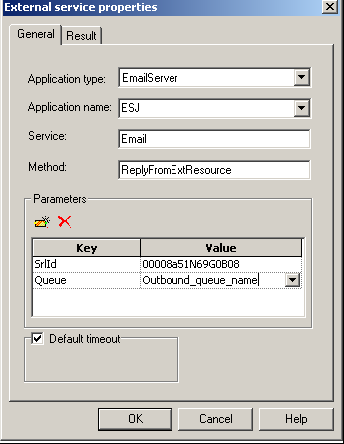 External Service Block PropertiesImportantAdditional optional parameters can be added. Refer to the Reply Email From External Resource block description in the Universal Routing 8.1 Reference Manual for more information.
 - Save and reload the modified strategy.

Find the Standard Response ID
Comments or questions about this documentation? Contact us for support!